On this page
An IoT device is useful only when its data can reach the systems that need it, or when the device can communicate with another system locally to perform its intended function.
Connectivity is therefore a core part of IoT solution design. It affects device selection, deployment effort, coverage, data costs, security, reliability and ongoing support.
There is no single network technology that suits every connected device. A temperature sensor inside a building has different needs from a vehicle travelling between countries or an industrial gateway collecting data from multiple machines. Choosing the right approach begins with understanding the application, environment and information flow.
01What is IoT connectivity?
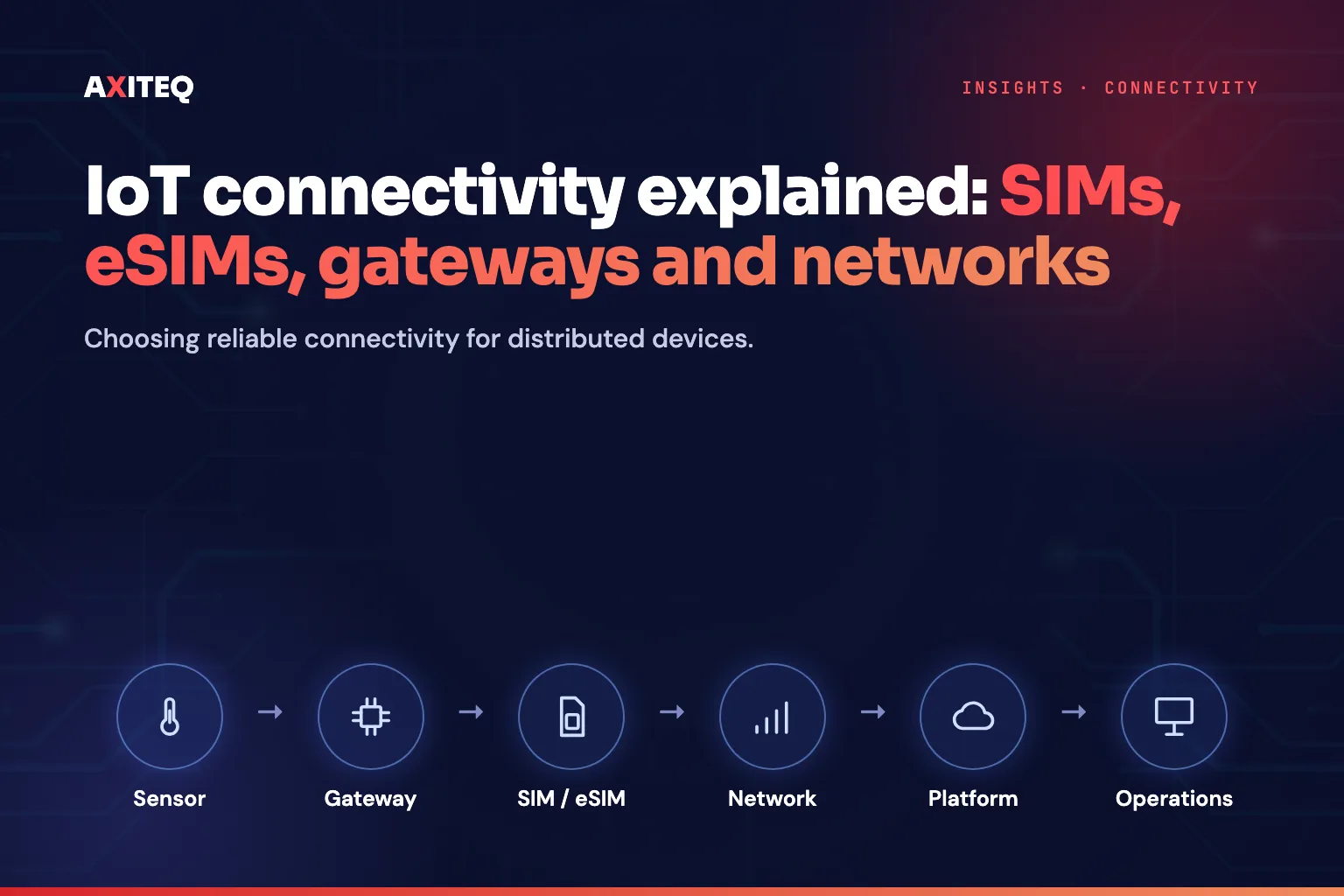
IoT connectivity refers to the technologies and services that allow connected devices to exchange data with gateways, platforms or other systems. A typical data path looks like this:
Sensor or equipment
Where the data is measured or produced.
Local interface or gateway
Collects and forwards data, sometimes from several devices.
Communication network
Wired, wireless or cellular link to the wider system.
IoT platform
Receives, stores and evaluates the data.
Operational application
Where people and business systems act on it.
Some devices connect directly to a network. Others communicate with a local gateway, which aggregates data from several devices and forwards it upstream. The architecture depends on range, power consumption, data volume, latency, coverage, environmental conditions and the need for local processing.
02Common IoT connectivity options
Wired Ethernet
Common in industrial and commercial environments; predictable connectivity for gateways, controllers and fixed installations. Consider cabling, installation access, network design and environment.
Wi-Fi
Practical in offices, buildings and some industrial facilities. Assess coverage, interference, roaming behaviour, network security and power; do not assume Wi-Fi covers every part of a facility.
Cellular
Connects distributed devices without a wired connection at each site: vehicles, remote equipment, utility installations. The right technology depends on local coverage, bands, device capability and data needs.
Low-power wide-area networks
LoRaWAN and cellular LPWAN options suit devices that send small amounts of data and must conserve power. They are not interchangeable: compare coverage, payload, update frequency, ownership, latency and infrastructure.
Bluetooth and local links
Short-range technologies connect sensors to a nearby gateway or mobile device. Useful where a local connection is enough, but remote visibility may need an additional network path.
A cellular modem and SIM do not guarantee service in every location. For international deployments, roaming agreements, supported networks and local requirements may also affect connectivity.
03What is an IoT SIM?
An IoT SIM enables a compatible cellular device to authenticate to a supported mobile network using a subscription and associated credentials. Depending on the service, an IoT connectivity offering may include data plans, network access, roaming, usage reporting, device management and support. Before selecting an IoT SIM, evaluate:
- Coverage in the actual deployment locations
- Supported network technologies and frequency bands
- Domestic and international roaming requirements
- Data allowances and charging models
- SIM lifecycle and activation processes
- Access to usage information and connectivity status
- Support arrangements and service continuity
- Security and access controls
A consumer mobile plan may not provide the commercial controls, management visibility or deployment model required by an enterprise IoT fleet. See what CMP-grade connectivity means for managing SIMs at scale.
04What is eSIM, and how is it different?
The term eSIM can refer to embedded SIM hardware or, in common commercial usage, the broader ability to provision cellular subscription profiles digitally. The precise implementation depends on the device and standard.
In a compatible device, eSIM technology can allow subscription profiles to be provisioned or managed without physically replacing a removable SIM card. This is useful when devices are deployed at scale, installed in difficult-to-access locations or expected to operate across different markets.
eSIM does not automatically mean that every operator can be switched instantly or that all subscriptions are universally interchangeable. A deployment must account for device compatibility, supported eSIM standards, operator agreements, provisioning systems, profile lifecycle management, coverage and applicable commercial or regulatory requirements.
Questions to ask about eSIM deployment
- Does the device support the required eSIM implementation?
- Which operators and profiles are available for the target markets?
- How are profiles provisioned, activated, changed and retired?
- What happens if provisioning fails or a device loses connectivity?
- How is the profile lifecycle secured and audited?
- Who owns the connectivity service and supports operational issues?
For large fleets, the provisioning process and ongoing management model can be as important as the SIM technology itself.
05What role does an IoT gateway play?
An IoT gateway connects local equipment to a wider network or platform. It may provide protocol conversion, data aggregation, edge processing and connectivity management.
Several industrial controllers communicate with a gateway over a supported local protocol. The gateway then forwards selected data to a central platform over Ethernet or cellular connectivity.
Fewer direct connections
A gateway can reduce the need for every sensor to have its own direct internet connection.
Isolation
It can also help isolate industrial equipment from external networks.
Gateway selection should consider protocol compatibility, device capacity, environmental rating, power, local buffering, security features, remote administration and long-term support. For connecting existing machines, see how to connect legacy industrial equipment.
06How to choose the right connectivity architecture
- Start with the use case.
Define what the device measures, how frequently it sends data and whether it needs to receive commands. A device reporting a small status message has different needs from one sending large diagnostic records.
- Map the deployment locations.
Identify where devices will operate, including basements, remote sites, industrial facilities, vehicles and international routes. Verify actual coverage and installation constraints instead of relying only on broad coverage maps.
- Estimate data and power requirements.
Estimate data volumes, reporting frequency, peak usage and power availability. Include overhead from reconnection, retries, updates and diagnostics.
- Define reliability expectations.
Decide how the solution behaves during network interruptions: local buffering, retry policies, duplicate-message handling, data freshness and recovery.
- Design security across the full path.
Device identity, authentication, encryption where supported, network segmentation, access permissions, credential management, firmware updates and remote administration, covering the device, gateway, connectivity service and platform, not just the network connection.
- Plan lifecycle management.
How devices are activated, configured, monitored, updated, transferred between owners and decommissioned. At scale, consistent lifecycle processes reduce operational overhead.
07Connectivity management is an ongoing operational responsibility
A successful connection at installation does not guarantee reliable operation for the life of the device.
Organisations may need to monitor device status, data usage, connectivity failures, subscription lifecycle events and unexpected consumption. They should also understand who investigates a failure: the hardware provider, connectivity provider, platform operator or internal support team.
For international or large-scale deployments, clarify ownership and escalation before rollout.
08Common connectivity mistakes
- Choosing on price alone.
Low-cost connectivity may not meet coverage, support or lifecycle requirements.
- Assuming global coverage.
Verify supported networks and commercial arrangements in each deployment market.
- Ignoring offline behaviour.
Devices and gateways need an appropriate response when the network becomes unavailable.
- Treating eSIM as a complete solution.
Profile provisioning, operator availability, device compatibility and service management still matter.
- Overlooking security.
Avoid unnecessary public exposure of equipment and make sure access is appropriately controlled. See the Security page.
- Skipping field testing.
Test representative devices at real deployment locations under realistic operating conditions.
Connectivity is an architectural decision.
IoT connectivity is not simply a SIM or network purchase. Wired and wireless networks, cellular services, SIMs, eSIMs and gateways each solve different problems. The right design balances coverage, reliability, power, data requirements, security, lifecycle management and cost, and defines how connectivity problems will be detected and resolved after deployment. Explore our services and AxiOS platform.
 Denver (USA)
 Riyadh (KSA)
 Islamabad (PK)
- Target locations
- Device capabilities
- Expected data volumes
- Recovery requirements
10Sources and further reading
- eSIM Consumer and IoT Specifications (including SGP.32 for IoT) GSMA
- What is LoRaWAN? LoRa Alliance
- NIST IR 8259A: IoT Device Cybersecurity Capability Core Baseline National Institute of Standards and Technology
11Frequently asked questions
What is IoT connectivity?
The technologies and services that let connected devices exchange data with gateways, platforms or other systems, such as Ethernet, Wi-Fi, cellular, low-power wide-area networks and short-range links.
What is an IoT SIM?
A SIM that lets a compatible cellular device authenticate to a supported mobile network. Enterprise IoT services may add roaming, usage reporting, device management and support that consumer plans lack.
How is eSIM different from a regular SIM?
In a compatible device, eSIM lets subscription profiles be provisioned or managed digitally without swapping a physical card. It does not mean every operator can be switched instantly.
What does an IoT gateway do?
It connects local equipment to a wider network or platform, and may handle protocol conversion, data aggregation, edge processing, buffering and isolation of industrial equipment from external networks.
How do we choose the right connectivity?
Start from the use case, map real deployment locations, estimate data and power needs, define behaviour during outages, secure the full path and plan device lifecycle management, then field-test.
12Final thoughts
The right connectivity design balances coverage, reliability, power, data, security, lifecycle and cost, and says who resolves problems after deployment.
Before choosing a network, answer- Where will devices operate?
- How much data, how often?
- What happens when the network drops?